Gentle Intro to CUDA
Terminology
- Block: A (software-level) grouping of threads. Threads in the same block can corporate, share data using shared memory (which is local to that block), and synchronize with __syncthreads()
- Warp: A (hardware-level) group of (32) GPU threads created by the hardware from our blocks. All threads in a warp can only execute the same instructions (SIMT)
- Grid: A collection of blocks. Blocks don’t cooperate directly - they can’t share memory or synchronize with each other. Each block runs the same kernel code independently
- GPUs have a maximum threads-per-block limit (limited by hardware). Grid size (no of blocks we can fit in a grid) is limited too, but extremely large
Key Ideas
Typical CUDA program
- CPU allocates memory on the GPU via
cudaMalloc() - CPU copies data to GPU via functions like
cudaMemcpy() - CPU launches kernel on GPU via
<<grid, block>>syntax - CPU copies result from GPU back to CPU via
cudaMemcpy()
When we launch a CUDA kernel, we create a grid. A grid is a collection of blocks. Each block contains many threads and runs on one SM. Multiple blocks may run on the same SM concurrently.
Each CUDA block is broken into warps of 32 threads. All 32 threads in a warp share the same program counter, and they execute the same instruction at the same time. However, they each operate on different registers and memory.
SM doesn't run threads one-by-one - it schedules execution at the warp level. Each SM maintains many resident warps (commonly 32-64 or more), and its warp scheduler selects the warps to be executed by the SM in the current cycle.
A warp scheduler doesn’t run threads. It issues the warp’s next instructions to the SM’s execution units. If an SM has 4 warp schedulers, it can issue up to 4 instructions per cycle (one per scheduler)
NVIDIA GPUs hide latency by keeping many warps ready to run. If one warp stalls, the SM instantly switches to a different ready warp with zero overhead.
In a kernel, we use thread indices to divide the work.
Memory Hierarchy
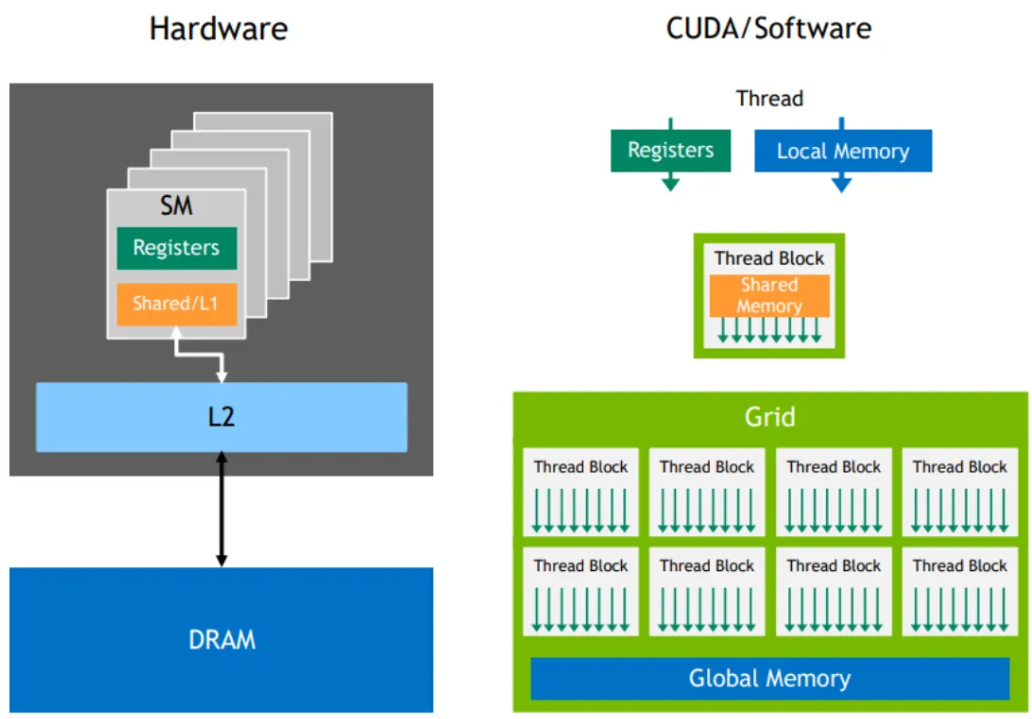
CUDA provides several types of memory, each with different speeds & uses
- Global Memory: The main memory of the GPU, visible to any kernel (i.e. accessible by all threads across all blocks across all kernels), as well as the CPU
- Slowest but largest in size. Used for data shared across all threads (e.g. Arrays, large datasets)
- Shared Memory: Memory shared by all threads in the same block.
- Very fast but small in size. Used for data that threads in a block need to share frequently (e.g. temporary variables)
- Registers: Fastest memory, private to each thread
- Used for local variables. Limited in numbers - use wisely. (e.g. Loop counters, intermediate calculations)
- Constant Memory: Read-only memory visible to any kernel, as well as the CPU
- Cached for fast access. Use for data that doesn’t change during kernel execution (e..g constants, config params)
- Local Memory: Device global memory (GPU’s global DRAM), used when registers are not enough
- Slow; avoid if possible (e.g. large arrays/variables that don’t fit in registers)
TLDR
- Per-thread registers: Lowest possible latency
- Per-thread local memory: Private storage, slowest access
- Per-block shared memory: Visible by all threads in a block. Can be used to exchange data between threads in a thread block. Very fast access
- Global memory: Visible by all threads in a grid. Slowest access
Thread Hierarchy
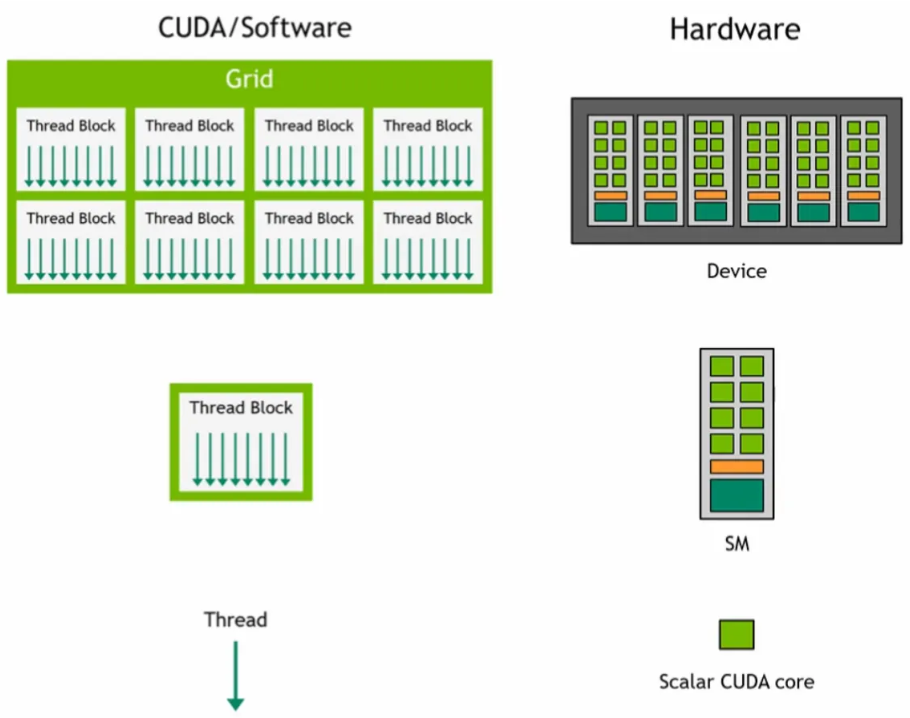
A CUDA kernel is launched on a grid of thread blocks
- Thread blocks are a group of threads. Each block is scheduled & executed on an SM blocks are scheduled on any available SM, in any order. Multiple thread blocks can run on the same SM
- Individual threads execute on scalar CUDA cores
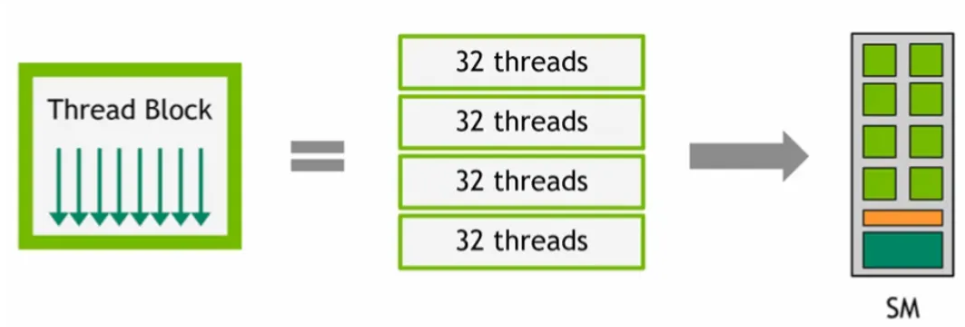
At runtime, a thread block is divided into warps for SIMT execution
- The way a block is partitioned into warps is always the same. Each warp contains threads of consecutive, increasing thread IDs with the first warp containing thread 0
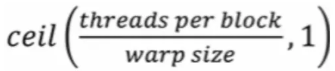
The total number of warps in a block is
CUDA Optimization
There are many ways to optimize CUDA kernels, including optimizing memory access & cache line usage, choosing good grid & block sizes, tiling with shared memory, minimizing thread divergence, etc..
We’ll focus on one of them - choosing good grid & block sizes
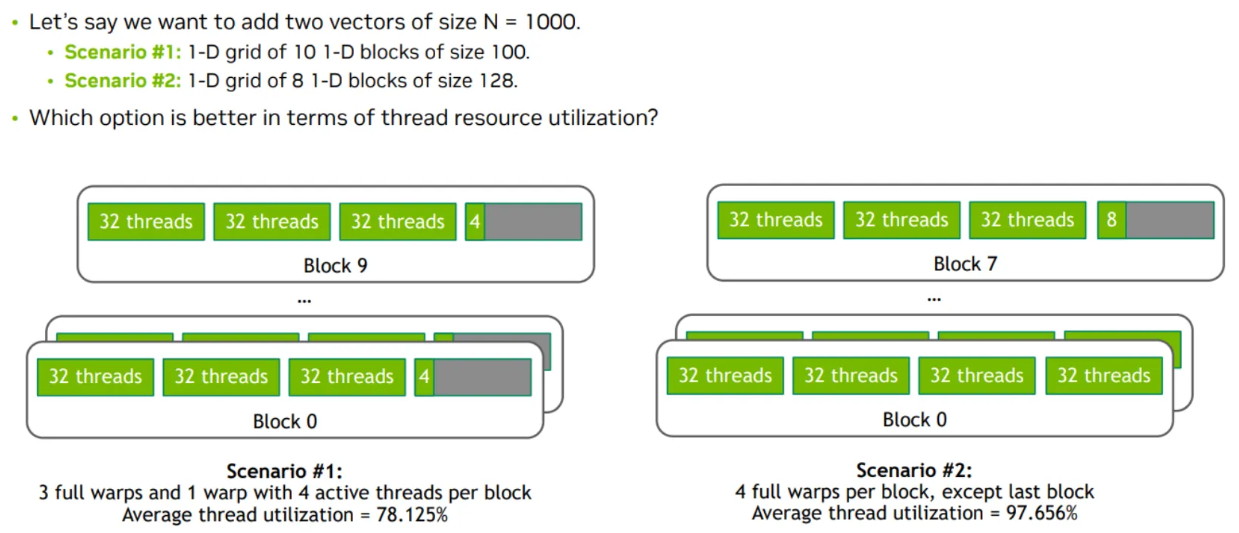
- Thread blocks are divided into warps of 32 threads (warp size) each
- In scenario #1, each thread block has 4 warps. But since we set block size to 100 (which isn’t a multiple of warp size), each block’s last warp will only use 4 threads
- In scenario #2, each thread block has 4 warps. As we set the block size to 128 (which is a multiple of 32, the warp size), only the last block’s warp will not be fully used
We can maximize performance by saturating compute units & memory bandwidth
Little’s Law: Concurrency (In-flight work) = Bandwidth (Throughput) x Latency
E.g. We have 8 FP32 units with a latency of 24 cycles (i.e. each FP32 op takes 24 cycles from issue to completion), and we can issue 8 ops per cycle
- To saturate all 8 units (to keep all 8 units fully busy every cycle), we need 8x24=192 operations in-flight. That means we need 192 instructions executing in our pipeline (across all 8 units) at the same time, to keep them fully busy
- Even though each FP32 op takes 24 cycles to complete, the pipeline can accept a new op every cycle per FP32 unit
We can increase in-flight instructions (instructions currently being processed, but not yet completed) via 2 ways
- Increase instruction-level parallelism: Have more independent instructions (don’t depend on each other) per thread

- While instruction 1 is halfway through its 24-cycle FP pipeline, instruction 2 & 3 can be issued…
- Increase Thread-level Parallelism: TLP = how many warps are resident (loaded & ready to run on an SM) on an SM at the same time. Increase no. of warps available for the SM to schedule by increasing block size (more threads -> warps per block), or increase no. of blocks in the grid so every SM always has blocks available to schedule
- An SM has 3 separate limits: Max threads per SM, max warps per SM, max blocks per SM. SM occupancy is determined by whichever limit is hit first
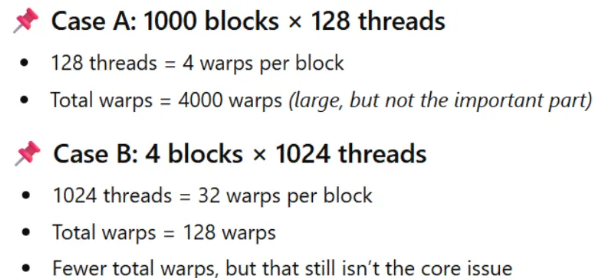
- Case A, we have a total of 4000 warps. Case B, we have a total of 128 warps
- A: If an SM can hold 64 warps simultaneously, each SM can hold 16 blocks (4 warps/block)
- B: The same SM can hold only 2 blocks (32 warps/block)
- Large blocks reduce TLP, because fewer blocks = fewer scheduling opportunities. If a block stalls on memory, shared memory barrier, etc… the SM has no other blocks to switch to.
- Case A is better...