Custom Agent Setups
First, why even bother changing the default setup? Isn’t claude code’s (what I use) harness already sufficient?
That setup works out of the box. If you’re using Claude to do simple coding or routine tasks, Claude’s in-built harness is more than enough. But as I used Claude for longer, and as my use cases became more complex (bigger projects, etc.), I found myself having to customize its behavior more. With this came lots of upkeep I wasn’t expecting. For example, as my CLAUDE.md grew (e.g. I asked it to record down my preferences), it was taking up more context, and I had to trim it down. Or I found myself downloading many skills, some of which overlapped in purpose.
I didn’t even realize I was doing so much manual maintenance until one day, I took a step back and asked: “Why not just have an agent do these things for me?” I guess I was too used to doing things the “traditional way,” manually debugging any issues my claude code setup was having. In the earlier days (2023-2025) of AI tooling, it was necessary for me to manually fix issues because the models weren’t powerful enough to maintain and manage themselves, but today’s models have advanced so much.
Challenging those underlying assumptions required me to even realize they were there in the first place (which is why they’re “underlying” to begin with). But once I did, I saw things in a different light.
I guess my mindset has changed to “what should I not automate?” Now, it’s an implicit assumption that I’ll have agents do most of the legwork for me - even the process of managing agents, or maintaining my harness can be done by an agent itself. So I spend more time figuring out what I should keep for myself instead (e.g. what design templates to use, architectural decisions) - what details should I control or know about.
To automate as much as possible, I needed a system. I had a few key requirements:
- It should learn from my habits and its own mistakes, so I don’t have to repeat myself
- It should proactively diagnose issues and fix itself, instead of waiting for something to break
That system is what I call my harness.
Designing my Harness
I realized I had to update my harness because
- I found myself repeating the same instructions to Claude, having to correct similar mistakes
- I would burn the entirety of my ultra plan’s weekly limit within 2 days. I initially thought it was a good thing (that I was maximizing my subscription plan) but I also realized I could be using these models in a more token efficient manner
- I realized lots of manual maintenance I did stemmed from mistakes created by myself - whether it was outdated prompts (“prompt debt”) or conflicting instructions. And this was taking lots of time or consuming my mental bandwidth
For example, I might tell Claude to update its global instructions such that it follows A, but 6 months down the road I tell it to follow B (which contradicts A). My CLAUDE.md ends up having contradictory instructions which confuses the agents.
So I need to make my harness “me-proof” - defensive against any issues I might create. For example, I can have a global rule that says: “Whenever you update any of your agent files, you will see if it contradicts existing rules, and question me so we know what to use,” then I’ve set up dynamic guardrails that prevent these cases from arising.
For bigger projects, I find ways to parallelize the tasks. My main agent never codes (unless it’s a very small task it can do itself; it’ll take a longer time if we spin up a subagent). It mostly acts as an orchestrator that breaks down tasks into parallelizable ones, and delegates them to the appropriate subagent (based on task complexity).
My harness design principles are
- Create systems for everything. Standardize workflows across projects (e.g. what “agent files” to use - more on it later) so I have the same understanding of how my harness works. This reduces chances of me modifying my harness for one specific project, only for it to cause regressions in other projects.
- Don’t repeat yourself. Never make agents the same mistake twice - make sure they learn from every interaction, whether it’s machines (e.g. a compiler saying the agent wrote bad code) or me. Have it log down its mistakes, how to prevent it, and have it ask me questions if it’s not exactly sure what went wrong, or why.
- Let Claude manage itself, only intervene when it fails: I find ways for Claude to manage itself. For instance, instead of babysitting Claude's scheduled tasks (I’ll call these L1 crons), I have yet another scheduled task (I'll call these L2 crons) to periodically check my L1 crons and fix bugs, if any… So I’ve essentially replaced myself with an L2 cron, which proactively monitors and fixes bugs for me
- Verify, don’t blindly trust results or rely on “intuition”: E.g. Run evals to see which agent configs work best, whether an old system prompt still helps a newer model’s performance.
- Compact where possible: E.g. If multiple recorded mistakes have the same underlying lesson, merge them into one… if not, our agent files will just indefinitely grow and flood our context
I have 2 crons for maintenance
- A weekly harness review: Looks at my current week’s chat sessions for instances of user annoyance, conflicting instructions in agent files, and proposes changes (whether to update its LESSONS.md, deconflict system prompts, etc.). See where most of my token usage went into, so I can devise more efficient strategies if needed
- A monthly harness review: Fuller audit, which uses the in-built “/doctor prompt-audit” skill. Also looks at all the skills, system prompts, memory. Looks at blog posts/articles to see if my subagents are still necessary or not (when later models come out), and whether my prompts are outdated
Agent Files
For larger projects, I ask Claude to follow a set of agent files when it is doing work
- ~/.claude/SETUP.md (global): For me (human) to understand how the important MCPs/Plugins/Crons work
- ~/.claude/CLAUDE.md (global): rules for every project, and global preferences
- CLAUDE.md (project): what everyone working on this project must know. 2-3 line summary of the app (full details in SPEC.md), how to run, deploy and debug it, safety rules, project-specific instructions
- ~/.claude/USER_PREFERENCES.md (project): Global preferences
- USER_PREFERENCES.md (project): My preferences for this project… whether its app choices (design, product decisions) or workflow choices (how i work with claude code itself)
- ~/.claude/CODING_STANDARDS.md (global): how code must be written (best practices, patterns, antipatterns). Given to subagents who write code
- CODING_STANDARDS.md: coding standard specific to this project (e.g. we’re using an unusual framework, etc.)
- RESUME.md: In case the session compacts or suddenly stops, we can re-continue easily. Loads automatically on every restart or new session (via claude hook; only for main agent, not subagents)
- Records what is being done now, results we haven't seen yet, questions I hadn’t answered, promises (what it promises to do, e.g. “I’ll report back after the build”), the next 1-2 things it will do after it’s done with the current task (full list is in todo.md).
- TODO.md: Full checklist categorized by “to do”, “in progress”, and “claimed done” (said done but not yet verified), “confirmed done” (confirmed working, with a summary of how). Also lists earlier bug attempts that didn't work.
- LESSONS.md: Claude’s mistakes (what went wrong, how to avoid), watch out for (traps, quirks, hidden problems in the setup)
- SPEC.md: full description of what the app is and does (features, screens, behaviour); read when needed
Optional (only when the project needs them)
- SCRATCHPAD.md: Working notes for long investigations (hard bugs, research), e.g. guesses and what was tried. Cleared when the task is done. Any long lasting lessons go to LESSON.md.
- plans/: plans for big pieces of work, and one-off reports such as QA or research
- DESIGN_CHANNEL_TO_DESIGN.md: tasks from the code agent to the design agent; only the code agent writes it
- DESIGN_CHANNEL_TO_CODE.md: replies from the design agent to the code agent; only the design agent writes it
The reason for the X_CHANNEL_TO_Y.md is that I use open design to come up with the UI first, refine those designs with me, and then have my claude code agent build from that design. It’s much cheaper this way. Our agents use these 2 md files to store what they want to tell each other. I’ve also set up an MCP server which allows these 2 agents to talk to each other (e.g. “Hey I’ve finished with the designs, pls read the DESIGN_CHANNEL_TO_CODE.md file and proceed”)
The global CLAUDE.md knows these agent files, and knows how to work with them.
- Only the main agent edits the RESUME.md, TODO.md, LESSONS.md, USER_PREFERENCES.md, SCRATCHPAD.md… subagents will report back and the main agent records it
- Subagents only read files that their brief (from the main agent) tells them to… e.g. CODING_STANDARDS, USER_PREFERENCES, LESSONS
- Save project preferences to USER_PREFERENCES.md, not memory
- For git, commit CODING_STANDARDS.md, SPEC.md. The rest are uncommitted (other agent files, including CLAUDE.md and the project’s .claude/ folder)
- Only use these agent files when claude thinks the project has grown big enough (it will tell us that it’s creating the full set of agent files). If it's a very small/trivial project we can just use CLAUDE.md, TODO.md, project preferences go into CLAUDE.md.
The agent file update rules are
- RESUME.md: the moment anything changes. Delete each item once it’s done and reported
- TODO.md: When a task starts, finishes or an attempt fails. Move to “confirmed done” after we’ve verified it works
- “Confirmed done” will get compacted based on feature. Once every item for one feature is confirmed working, we will merge into one entry… if not TODO.md will indefinitely grow…
- USER_PREFERENCES.md: when we state a preference or make a design/workflow-related decision
- LESSONS.md: when we correct claude or a hidden problem turns up
- CODING_STANDARDS.md: When a fix i ask claude to make teaches a coding lesson that can be kept… or I name a new coding practice
- SPEC.md: when the app’s specifications/features changes
- CLAUDE.md: when how to run/deploy the app changes, or safety rules change
Whenever I update my agent files (including the global CLAUDE.md).. It will
- Check if there’s any conflicting information. If there is, it will clarify with me first
- See if there’s duplicates that can be merged. We want to keep the files as short as possible
We can use hooks to ensure claude always loads a file during a new session (rather than using prompts to instruct it, and “hope” it follows those instructions)
- In our case, we use hooks to load the RESUME.md and USER_PREFERENCES.md files, whenever an agent starts
Observability & Evals
We can’t improve what we don’t measure.
For agent performance, I’d look at cost (how many tokens it uses per task), performance (how successful it is at its tasks), speed (how fast it accomplishes them).
After I make a change to my harness, I’ll run evals to see if they really improve my setup. I’ll ask Claude to create a one-off check in two weeks, and compare the performances (then vs now; looking at the conversation session for avg tokens per task, success rate, cost per task, time elapsed, etc.), so I can decide which is the better option.
To keep track of my harness (because it’s always changing), I have a global SETUP.md which tells me what custom skills, mods, crons, subagents, key settings I have. It’s basically a live inventory of my harness.
There’s a more systematic way we can do this, using Claude's inbuilt “/claude-api build-eval” command, which runs through designing an eval with us. It will come up with the tasks, how each agent will run them, how to grade those results, and calculate a baseline score.
Once we designed the evals, we can use /claude-api hillclimb to find the best configurations to improve on our created eval. I’ve not had a need to use this yet, so I can’t comment on how well it performs.
Good evals
- Have a clear verifiable objective… something claude can effectively hillclimb on. This can be avg tokens per task, lower user annoyances (can be plotted on a chart), etc.
- Prefer heuristic evals (deterministic checks). But for open-ended stuff, build a rubric a human can reason about (i.e. how the AI does the scoring, etc.) so you know how the AI is judging
- Don’t use arbitrary scores (e.g. score on a scale of 0-5), use binary classification instead (0/1)
- Test the same rubric across different models.. if they all disagree that's a bad sign
- Pairwise comparisons (this is good, this is bad) are an effective way to deal with ambiguous grading
My Mods
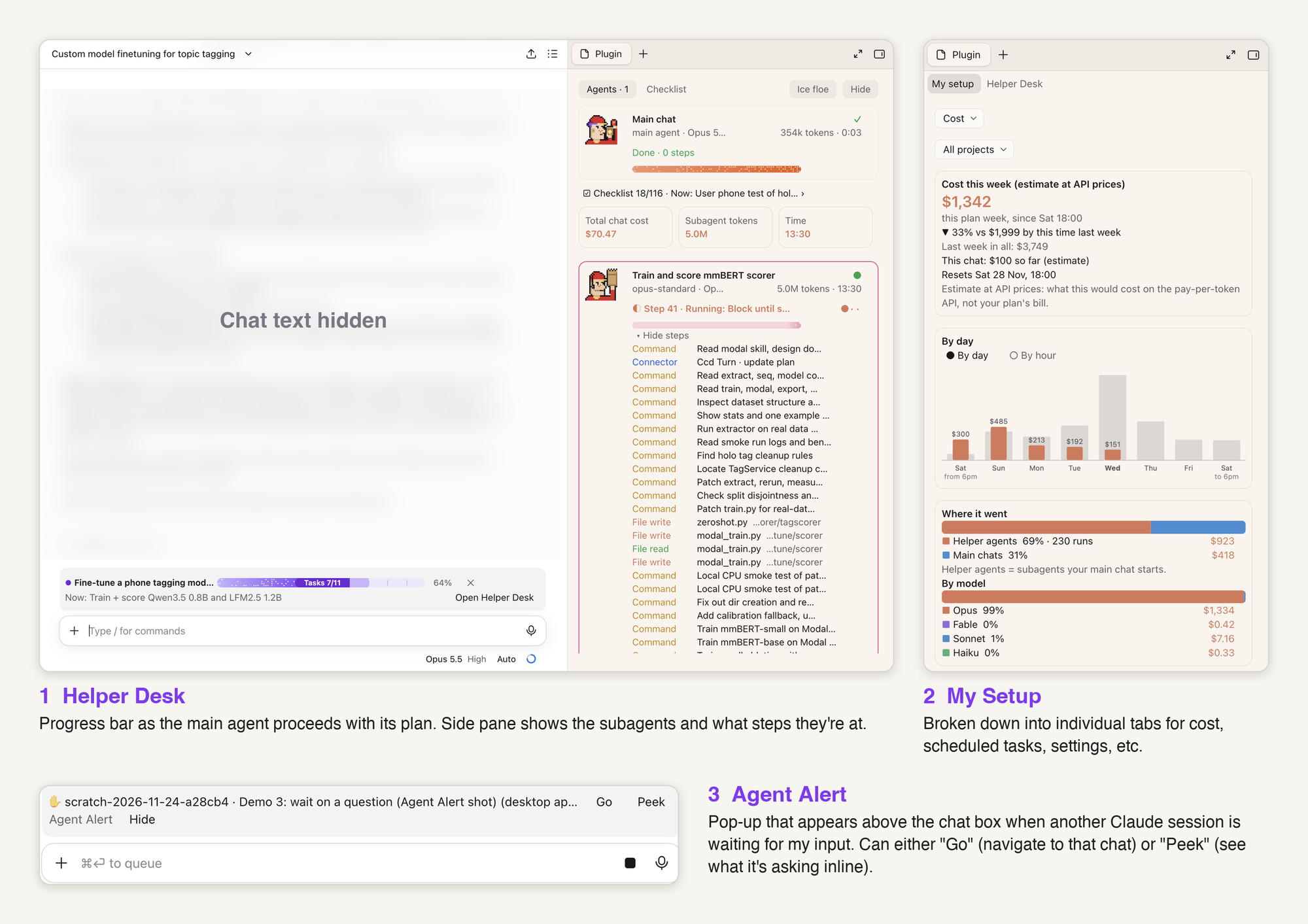
Mods are basically plugins that run inside Claude code sessions, allowing us to customize the UI.
I have 3 quality-of-life mods
- /my-setup: Shows the stats of my setup: cost usage (most expensive runs, etc.), scheduled tasks, custom agents, important mods/plugins/skills/mcps/settings, custom hooks
- /agent-alert: Tells me when another claude session needs me (approval, answer, question), with a “Go” button so I can navigate to that chat quickly
- /helper-desk: Shows all agents that are running, and what steps they’re at. Also has a checklist that tracks what is in progress, done, waiting on me.
Running Claude remotely
When I gave Claude a huge task, I had to leave my laptop open and running so it could continue. By running them remotely on a server (I use AWS lightsail), I don’t need to keep my laptop on. And I’m still able to control the session from my phone (via the claude app).
Method 1: Spin up a lightsail instance, install claude code, login… then use tmux to run claude remote-control, and make sure the server always starts this tmux CC session when the server is restarted
Method 2: Spin up a lightsail instance. Don’t have to install CC yourself. Add the server as an environment in your claude desktop app (SSH environment)… and when you spin up a CC session, set the environment as this one, and your claude desktop app will run the stuff on your remote lightsail server. However, the sign-in lasts only a short time, and our claude desktop keeps renewing that sign-in… it only renews when claude desktop is running, connected, and signed in
Member discussion